http://ebooksportal.org/
http://www.linksgarden.com/
http://viewzoft.com/
http://www.yui.ru/books/
http://www.flazx.com/
http://www.freetechbooks.com/
http://www.e-dsp.com/
http://www.bestebooksworld.com/
http://ebooks.ulb.tu-darmstadt.de/
http://www.ebooks.com
http://ebooksclub.org/
http://projectw.org/
http://www.gzthai.com/
http://allfree.fermanaziz.com/(free economics books)
http://www.ebooksmine.com/
http://www.asiaing.com/
http://freebooksforyou.co.nr/
http://www.artikel-software.com/blog
http://www.sallys-ebooks.co.uk/
http://william06370.tripod.com/index.html
http://www.softparadigm.com/eLibrary
http://www.ebookimpressions.com/forum
http://www.softpanorama.org/Scripting/Shellorama/papers_ebooks_and_tutorials.shtml
http://www.freeos.com/guides/lsst/
http://www.touchninspire.com/merewaten.html
Biggest Collection Of Tutorials, Tips And Tricks, Interview Questions
And Answers Oracle, Software Books, EJB C,C++,Java,PHP,Python,HTML
Software Engineering, SAP Script, ASP.NET, SQLServer, _JavaScript, VB,
CCNA, MCSE 1, MCSE2, MCSA, MCSD, SAP Architecture, SAP,ABAP, DHCP,
Firewall, Prevent Spam , Learn Six Sigma, Quality , Speed Up Internet,
Secure Windows XP , Protect Email, Stop Browser Hijacking , Recover
Harddrive, Removing Spyware, Removing Virus , Digital Resource
Management , Network Security, SAP,ABAP, J2EE , SCJP, SQL
CMMI,DOTNET,JAVA,Networking,Testing, Windows, 2000-2005 Placement,
ASP,VB CCNA 1, CCNA 2, Peoplesoft, Placement Papers, EJB, J2ME,
Siebel, Future IT Skills , Network, Oracle, Testing, C#, .NET, ASP,
JSP in http://www.myitcareer.org/
http://www.myitcareer.org/
Tuesday, September 13, 2011

Sunday, August 7, 2011
Speed up ur PC by Increasing the FileSystem Memory Cache Size
According to the Microsoft documentation:
So try the following to increases ur system speed :
1)Command line
Open up an Administrator mode command prompt by right-clicking and choosing Run as Administrator, or type in cmd into the start menu search box and use Ctrl+Shift+Enter.
Type in the following command to increase the cache setting:
fsutil behavior set memoryusage 2
To check the current value, type in this command:
fsutil behavior query memoryusage
To change the setting back to the default, use this command:
fsutil behavior set memoryusage 1

2)Manual
Manual Registry Hack
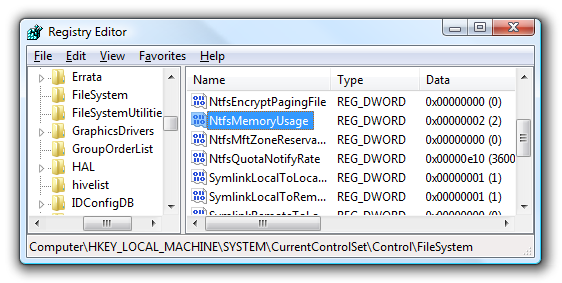
You can also set this value by changing a registry parameter. Open up regedit.exe through the start menu search or run box, and then navigate down to the following key:
HKEY_LOCAL_MACHINE\SYSTEM\CurrentControlSet\Control\FileSystem
Double-click on the NtfsMemoryUsage key on the right-hand side and change the value to 2. Here’s the available values:
Not Set: 0
Set to Default: 1
Increase Cache: 2
According to the documentation the default setting is “1″, but by default the key is set to “0″. Typically in that scenario the setting of “0″ means “Not Set”, which means the system uses the default setting. You should be able to change the value to either “0″ or “1″ in order to change this back to default.

Reboot ur pc to visualize the changes!!!
Increasing physical memory does not always increase the amount of paged pool memory available to NTFS. Setting memoryusage to 2 raises the limit of paged pool memory. This might improve performance if your system is opening and closing many files in the same file set and is not already using large amounts of system memory for other applications or for cache memory. If your computer is already using large amounts of system memory for other applications or for cache memory, increasing the limit of NTFS paged and non-paged pool memory reduces the available pool memory for other processes. This might reduce overall system performance.
So try the following to increases ur system speed :
1)Command line
Open up an Administrator mode command prompt by right-clicking and choosing Run as Administrator, or type in cmd into the start menu search box and use Ctrl+Shift+Enter.
Type in the following command to increase the cache setting:
fsutil behavior set memoryusage 2
To check the current value, type in this command:
fsutil behavior query memoryusage
To change the setting back to the default, use this command:
fsutil behavior set memoryusage 1

2)Manual
Manual Registry Hack
You can also set this value by changing a registry parameter. Open up regedit.exe through the start menu search or run box, and then navigate down to the following key:
HKEY_LOCAL_MACHINE\SYSTEM\CurrentControlSet\Control\FileSystem
Double-click on the NtfsMemoryUsage key on the right-hand side and change the value to 2. Here’s the available values:
Not Set: 0
Set to Default: 1
Increase Cache: 2
According to the documentation the default setting is “1″, but by default the key is set to “0″. Typically in that scenario the setting of “0″ means “Not Set”, which means the system uses the default setting. You should be able to change the value to either “0″ or “1″ in order to change this back to default.
Reboot ur pc to visualize the changes!!!
Friday, July 29, 2011
Getting Started with Android Using Eclipse
Android is growing continually in terms of devices and applications. If you want to program apps for the Android platform, you have to carry out a series of distinct steps. Initially, you need to create a development environment on your computer with all of the tools you need to get started. Setting up your environment is not typically difficult. Android application development is challenging, but anyone can learn it. As with any programming task, it's best to learn the key skills involved one at a time and build on your knowledge incrementally.
Instructions
1
Download the Eclipse Integrated Development Environment. All of the official Android development tools and resources are aimed at developing in Eclipse, so this is the ideal environment to use. Visit the Eclipse Foundation website, download and install the application. You will also need the Java Development Kit. If you do not already have it, visit the Java section on the Oracle website and download the latest JDK, following the installation instructions on the site.
2
Download the Android Software Development Kit. This resource contains the tools for developing Android apps. Visit the Android SDK download page on the official Android Developers Guide website and select the correct version for your operating system, then download and install it. In Eclipse, install the Android Developer Tools plugin by choosing "Select," "Install New Software" then entering the following location in the "Add Repository" dialog:
https://dl-ssl.google.com/android/eclipse/
Enter "ADT Plugin" as the name and click "OK" to install the tool.
3
Create a new project for each Android app you want to develop. Each time you create an Android project, you need to enter details of its application and package name, as well as which versions of the SDK you wish to target. You can create user interface designs for your app user interfaces using the XML layout files within your projects. Create an Activity for each screen within your application, implementing your program logic in Java code.
4
Enter the application version details for your Android projects in their Manifest files. Here you can add an incremental version number and name each time you upgrade an app. You can test and run your Android apps on your own Android devices while you are developing them. Within Eclipse, you can also use the Android Virtual Device Manager to run your apps on devices with hardware and software specifications of your choice
Refer::http://developer.android.com
Comment on this for more info abt android programming
Instructions
1
Download the Eclipse Integrated Development Environment. All of the official Android development tools and resources are aimed at developing in Eclipse, so this is the ideal environment to use. Visit the Eclipse Foundation website, download and install the application. You will also need the Java Development Kit. If you do not already have it, visit the Java section on the Oracle website and download the latest JDK, following the installation instructions on the site.
2
Download the Android Software Development Kit. This resource contains the tools for developing Android apps. Visit the Android SDK download page on the official Android Developers Guide website and select the correct version for your operating system, then download and install it. In Eclipse, install the Android Developer Tools plugin by choosing "Select," "Install New Software" then entering the following location in the "Add Repository" dialog:
https://dl-ssl.google.com/android/eclipse/
Enter "ADT Plugin" as the name and click "OK" to install the tool.
3
Create a new project for each Android app you want to develop. Each time you create an Android project, you need to enter details of its application and package name, as well as which versions of the SDK you wish to target. You can create user interface designs for your app user interfaces using the XML layout files within your projects. Create an Activity for each screen within your application, implementing your program logic in Java code.
4
Enter the application version details for your Android projects in their Manifest files. Here you can add an incremental version number and name each time you upgrade an app. You can test and run your Android apps on your own Android devices while you are developing them. Within Eclipse, you can also use the Android Virtual Device Manager to run your apps on devices with hardware and software specifications of your choice
Refer::http://developer.android.com
Comment on this for more info abt android programming
Sunday, June 19, 2011
Command Prompt Trick
Many computer users, specially the programmers, need to launch a command prompt window every once in a while to execute some dos/shell commands. The problem is, when a command prompt window launched, the default path is normally the system path or the user profile's path. The users will then have to do all the "cd" commands to change the directories to the path he/she wants.
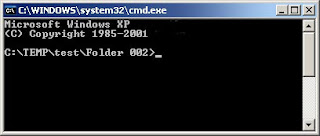
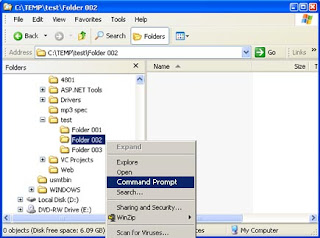
This trick shows you how to add an option called "Command Prompt" when you right-click on a folder in Windows. With this option, a Command Prompt Window will launch and its current directory will be the path to the folder you've selected.
Use this trick at your own risk.
Here's what you'll get:
The Solution
You can either edit your registry OR download the registry file and apply it on your computer.
Method I. Manually edit the registry:
Start > Run
Enter "regedit" and hit Enter
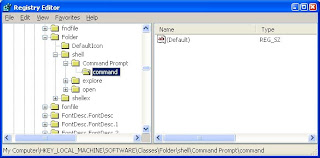
Expand to "HKEY_LOCAL_MACHINE\SOFTWARE\Classes\Folder\shell"
Right-click on "shell" and select New > Key
Make sure a new key is created under "shell". Change the name of this key to "Command Prompt"
Right-click on this new key "Command Prompt" and select New > Key
Change the name of this key to "command"
Here's what we should have:
Double-click on the "(Default)" text on the right window to bring up the edit box
Enter this text into the Value Data field:
cmd.exe "%1"
Click OK and close the registry.
NOW, U R DONE WITH IT !!!
This trick shows you how to add an option called "Command Prompt" when you right-click on a folder in Windows. With this option, a Command Prompt Window will launch and its current directory will be the path to the folder you've selected.
Use this trick at your own risk.
Here's what you'll get:


The Solution
You can either edit your registry OR download the registry file and apply it on your computer.
Method I. Manually edit the registry:
Start > Run
Enter "regedit" and hit Enter
Expand to "HKEY_LOCAL_MACHINE\SOFTWARE\Classes\Folder\shell"
Right-click on "shell" and select New > Key
Make sure a new key is created under "shell". Change the name of this key to "Command Prompt"
Right-click on this new key "Command Prompt" and select New > Key
Change the name of this key to "command"
Here's what we should have:

Double-click on the "(Default)" text on the right window to bring up the edit box
Enter this text into the Value Data field:
cmd.exe "%1"
Click OK and close the registry.
NOW, U R DONE WITH IT !!!
Sunday, January 9, 2011
Top sites for Free game downloads
1)http://www.top100gamesites.com
2)http://game-downloads.nettop20.com
3)http://www.shockwave.com
4)http://downloadgames.us.com
5)http://www.iwin.com
2)http://game-downloads.nettop20.com
3)http://www.shockwave.com
4)http://downloadgames.us.com
5)http://www.iwin.com
Friday, November 19, 2010
To cancel import scanning when Picasa start
>Start your Picasa
>Go to File -> Add Folder to Picasa
>Folder manager will pop up and now you can select which folder to perform the scanning whenever picasa start.
>To cancel scan for a folder, just Highlight the folder name and click “Remove from Picasa” and u’ll see the folder will be mark by a red cross. and this folder will not be scan by picasa from now on.
Sunday, July 25, 2010
Saturday, July 24, 2010
DWNLOAD TORRENT FILE WITHOUT TORRENT CLIENT!
Jus pate t file in t url of the followin websites
>bitlet.org
>torrent2exe.com
LOCK UR CD-ROM
>run regedit
>type ctrl+f
>type "allocatecdrom" in t dialog box opened
>change t value 4m 1 to 0
(0 to 1 => 4 reset)
Thursday, July 8, 2010
HIDE UR CALL HISTORY:)
ONLY 4 S60 MOBILES:
>MENU
>OPEN THE LOG
>SETTINGS
>LOG DURATION
>select NO LOG
FINISH!!
Wanna remove thumb.db file???
>TOOLS
>FOLDER OPTIONS
>VIEW
FILES&FOLDERS
> DO NOT CACHE THUMBNAIL...
DONE!
Pendrive solutions:
Have probs in formatting pendrive???
follow these steps..
>rt click on my computer
>manage
>disk management
>rt click on pen drive
>remove letter
>remove(plug out &plug)
>format
win hack
U can hack programs during win xp installation.........
jus follow these:
>press shift+F10 when"installing devices" appears
>then do dos programs whatever u want..:)
Dump error???????
If ur pc shows t dump error jus try the followin n get it done
>last installed program has infected ur system.so,try removin it.
>softly remove ur ram n clean it
>last installed program has infected ur system.so,try removin it.
>softly remove ur ram n clean it
USEFUL ABBREVIATIONS!!
Some abbreviations that we hear, read, and use and we don't know their meanings or are too shy to ask….
GPRS
(General Packet Radio Service)
TCP/IP
(Transmission Control Protocol and Internet Protocol)
ISP
(Internet Service Provider)
VHF
(Very High Frequency)
UHF
(Ultra High Frequency)
MPEG
(Moving Pictures Experts Group)
MP3
(MPEG-1 Audio Layer 3)
DSL
(Digital Subscriber Line)
IPO
(Initial Public Offerings)
FBI
(Federal Bureau of Investigation)
CIA
(Central Intelligence Agency)
S.W.A.T
(Special Weapons and Tactics)
GMC
(General Motors Corporation)
BMW
(Bavarian Motor Works)
HP
(Hewlett-Packard)
WWW
(World Wide Web)
HTTP
(HyperText Transfer Protocol)
URL
(Uniform resource Locator)
HTML
(HyperText Markup Language)
WAP
(Wireless Application Protocol)
PDF
(Portable Document Format)
MIDI
(Musical Instruament Digital Interface)
3GP or 3GPP
(3rd Generation Partnership Project)
AMR
(Adaptive Multi-Rate)
USB
(Universal Serial Bus)
MSN
(MicroSoft Network)
CNN
(Cable News Network)
BBC
(British Broadcasting Corporation)
NBA
(National Basketball Association)
FIFA
(in french, Federation Internationale de Football Association)
(in english, International Federation of Association Football)
UEFA
(Union of European Football Association)
NASA
(National Aeronautics and Space Administration)
OPEC
(Organization of the Petroleum Exporting Countries)
LNB
(Low Noise Block converter)
GPRS
(General Packet Radio Service)
TCP/IP
(Transmission Control Protocol and Internet Protocol)
ISP
(Internet Service Provider)
VHF
(Very High Frequency)
UHF
(Ultra High Frequency)
MPEG
(Moving Pictures Experts Group)
MP3
(MPEG-1 Audio Layer 3)
DSL
(Digital Subscriber Line)
IPO
(Initial Public Offerings)
FBI
(Federal Bureau of Investigation)
CIA
(Central Intelligence Agency)
S.W.A.T
(Special Weapons and Tactics)
GMC
(General Motors Corporation)
BMW
(Bavarian Motor Works)
HP
(Hewlett-Packard)
WWW
(World Wide Web)
HTTP
(HyperText Transfer Protocol)
URL
(Uniform resource Locator)
HTML
(HyperText Markup Language)
WAP
(Wireless Application Protocol)
(Portable Document Format)
MIDI
(Musical Instruament Digital Interface)
3GP or 3GPP
(3rd Generation Partnership Project)
AMR
(Adaptive Multi-Rate)
USB
(Universal Serial Bus)
MSN
(MicroSoft Network)
CNN
(Cable News Network)
BBC
(British Broadcasting Corporation)
NBA
(National Basketball Association)
FIFA
(in french, Federation Internationale de Football Association)
(in english, International Federation of Association Football)
UEFA
(Union of European Football Association)
NASA
(National Aeronautics and Space Administration)
OPEC
(Organization of the Petroleum Exporting Countries)
LNB
(Low Noise Block converter)
Sunday, June 13, 2010
Windows 7 Sins
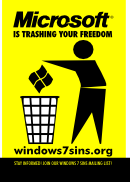
The new version of Microsoft's Windows operating system, Windows 7, has the same problem that Vista, XP, and all previous versions have had -- it's proprietary software. Users are not permitted to share or modify the Windows software, or examine how it works inside.
The fact that Windows 7 is proprietary means that Microsoft asserts legal control over its users through a combination of copyrights, contracts, and patents. Microsoft uses this power to abuse computer users. At windows7sins.org, the Free Software Foundation lists seven examples of abuse committed by Microsoft.
1. Poisoning education: Today, most children whose education involves computers are being taught to use one company's product: Microsoft's. Microsoft spends large sums on lobbyists and marketing to corrupt educational departments. An education using the power of computers should be a means to freedom and empowerment, not an avenue for one corporation to instill its monopoly.
2. Invading privacy: Microsoft uses software with backward names like Windows Genuine Advantage to inspect the contents of users' hard drives. The licensing agreement users are required to accept before using Windows warns that Microsoft claims the right to do this without warning.
3. Monopoly behavior: Nearly every computer purchased has Windows pre-installed -- but not by choice. Microsoft dictates requirements to hardware vendors, who will not offer PCs without Windows installed on them, despite many people asking for them. Even computers available with other operating systems like GNU/Linux pre-installed often had Windows on them first.
4. Lock-in: Microsoft regularly attempts to force updates on its users, by removing support for older versions of Windows and Office, and by inflating hardware requirements. For many people, this means having to throw away working computers just because they don't meet the unnecessary requirements for the new Windows versions.
5. Abusing standards: Microsoft has attempted to block free standardization of document formats, because standards like OpenDocument Format would threaten the control they have now over users via proprietary Word formats. They have engaged in underhanded behavior, including bribing officials, in an attempt to stop such efforts.
6. Enforcing Digital Restrictions Management (DRM):With Windows Media Player, Microsoft works in collusion with the big media companies to build restrictions on copying and playing media into their operating system. For example, at the request of NBC, Microsoft was able to prevent Windows users from recording television shows that they have the legal right to record.
7. Threatening user security: Windows has a long history of security vulnerabilities, enabling the spread of viruses and allowing remote users to take over people's computers for use in spam-sending botnets. Because the software is secret, all users are dependent on Microsoft to fix these problems -- but Microsoft has its own security interests at heart, not those of its users.
hack
I found another hacking technique which is quite popular now a days that is USING VIDEO SITES, TROJANS are delivered to your pc. Yes, by visiting a video site, if you download the codec to view the video, you can install a server on your machine.
These technique uses a software called DOWNLOADER which is basically a small client which receives malware on your machine, if installed. Usually if some link is taking you to some page with VIDEO PLAYER but you are not able to view the video ( and you will not able to view the video for sure, because there is no video for you, just an outfit of a video player is there), website will ask you to download the CODEC ( small piece of software which enables the machine to play different types of media files). Actually this will not be a codec, but a trojan program which will be installed on your machine. Now the person who is having server for this DOWNLOADER, can send any kind of malware to your machine. It works like a door for HACKER. Now HACKER can not only retrieve your personal data but also can test his/her viruses on your machine. It helps HACKER to always update his VIRUS before your anti-virus start recognizing the virus.
This is damn good way of spreading viruses and now a days FACEBOOK and GOOGLE are really fighting with this problem. According to CNET News , on your facebook, you will receive a message which will contain google link to view a video, when you click on link, it will take you to some non-google page and ask you to download codec to view the video. and in above mentioned way DOWNLOADER will be installed on your machine.
So, BEWARE ALL FACEBOOK USERS. IF YOU ARE RECEIVING SUCH MESSAGES , DON'T FOLLOW THEM.
ref::
http://news.cnet.com/8301-1009_3-10078353-83.html
These technique uses a software called DOWNLOADER which is basically a small client which receives malware on your machine, if installed. Usually if some link is taking you to some page with VIDEO PLAYER but you are not able to view the video ( and you will not able to view the video for sure, because there is no video for you, just an outfit of a video player is there), website will ask you to download the CODEC ( small piece of software which enables the machine to play different types of media files). Actually this will not be a codec, but a trojan program which will be installed on your machine. Now the person who is having server for this DOWNLOADER, can send any kind of malware to your machine. It works like a door for HACKER. Now HACKER can not only retrieve your personal data but also can test his/her viruses on your machine. It helps HACKER to always update his VIRUS before your anti-virus start recognizing the virus.
This is damn good way of spreading viruses and now a days FACEBOOK and GOOGLE are really fighting with this problem. According to CNET News , on your facebook, you will receive a message which will contain google link to view a video, when you click on link, it will take you to some non-google page and ask you to download codec to view the video. and in above mentioned way DOWNLOADER will be installed on your machine.
So, BEWARE ALL FACEBOOK USERS. IF YOU ARE RECEIVING SUCH MESSAGES , DON'T FOLLOW THEM.
ref::
http://news.cnet.com/8301-1009_3-10078353-83.html
Unthinkable Hacking Techniques !!!
Hi Guys ! I am posting this article for those who use pirated softwares. Because this is the time to stop using pirated softwares. You can't even imagine what your loss can be if you are using your PC for professional purposes.
Usually we download softwares from various forums/boards which provides cracks or keygens. These keygens are not only keygens but most of the time small server programs (hack tool) which transfers your sensitive data over internet to someone. If you are using Windows Firewall , it is quite easy to bypass the windows firewall. you won;t be able to know that your data is being sent over the internet. and Same thing goes for the CRACKS also. Spreading trojans is quite easy by providing game cracks or some full screen applications. Because user won't be able to know what is going on behind the fullscreen. So beware of using cracks and keygens. Your antivirus may or may not detect such malware. Now a days viruses are created more rapidly than detected.
Another MOST DANGEROUS HACKING TECHNIQUE is quite undetectable. You know what are you type in browser's address bar is resolved by your ISP's Domain Name Servers. What if your request goes to a hackers's machine first and then goes to ISP. Yes, this is possible a simple VBSCRIPT or WSH Script can do the trick. you won't be able to know that you are being watched or you are being traced. No firewall or no anti-hacking tool wil help you. Usually such scripts might be available as registration scripts for some kind of softwares.
Now About Windows XP users, this operating system's services are available through internet which can be very dangerous. Do you that by default you are all drives are ready to share data over network. Another thing is TERMINAL SERVICES which allows multiple users on a single machine. It means if you are working on your machine, if someone can log in to your machine remotely and you won't be alerted.
If you are downloading Operating Systems from Internet. Then take care that you download from trusted sources only. Cause it is very easy to embed some tracking code into your OS Images which can not be detected later on by any security software.
If you are using LINUX Operating Systems, it is highly recommeded that you use the softwares from trusted sources only otherwise you can be hacked or can cause damage to your machine.
Another good hacking tool is sniffer which is used by network administrator. It scans the network traffic and can filter sensitive information like passwords, credit card numbers etc. So if you are using credit cards at cafes so beware. you can be victim.
Usually we download softwares from various forums/boards which provides cracks or keygens. These keygens are not only keygens but most of the time small server programs (hack tool) which transfers your sensitive data over internet to someone. If you are using Windows Firewall , it is quite easy to bypass the windows firewall. you won;t be able to know that your data is being sent over the internet. and Same thing goes for the CRACKS also. Spreading trojans is quite easy by providing game cracks or some full screen applications. Because user won't be able to know what is going on behind the fullscreen. So beware of using cracks and keygens. Your antivirus may or may not detect such malware. Now a days viruses are created more rapidly than detected.
Another MOST DANGEROUS HACKING TECHNIQUE is quite undetectable. You know what are you type in browser's address bar is resolved by your ISP's Domain Name Servers. What if your request goes to a hackers's machine first and then goes to ISP. Yes, this is possible a simple VBSCRIPT or WSH Script can do the trick. you won't be able to know that you are being watched or you are being traced. No firewall or no anti-hacking tool wil help you. Usually such scripts might be available as registration scripts for some kind of softwares.
Now About Windows XP users, this operating system's services are available through internet which can be very dangerous. Do you that by default you are all drives are ready to share data over network. Another thing is TERMINAL SERVICES which allows multiple users on a single machine. It means if you are working on your machine, if someone can log in to your machine remotely and you won't be alerted.
If you are downloading Operating Systems from Internet. Then take care that you download from trusted sources only. Cause it is very easy to embed some tracking code into your OS Images which can not be detected later on by any security software.
If you are using LINUX Operating Systems, it is highly recommeded that you use the softwares from trusted sources only otherwise you can be hacked or can cause damage to your machine.
Another good hacking tool is sniffer which is used by network administrator. It scans the network traffic and can filter sensitive information like passwords, credit card numbers etc. So if you are using credit cards at cafes so beware. you can be victim.
Subscribe to:
Posts (Atom)